Just updated to Reinhardt.
You are currently browsing the archive for the WordPress category.
I had always been a bit reluctant to enable the XML-RPC publishing feature on my blogs because this can be just an extra attack vector to a site. It is, however, required when you want to manage a WordPress blog using WordPress for BlackBerry. When your BlackBerry is connected to a corporate network using BlackBerry Enterprise Server, and your organization’s admins are OK with you using your mobile device and the corporate server to manage your blog (or if it’s a company website anyway), you can add the following lines to your .htaccess file to block any XML-RPC access to your blog which is not coming from your corporate server:
<Files xmlrpc.php> Order allow,deny allow from 198.51.100.27 </Files>
You will have to replace 198.51.100.27 with the IP address of your BlackBerry Enterprise Server.
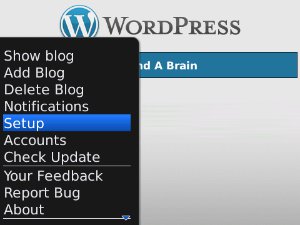
Now you will also need to setup the WordPress app on your mobile device to use the BlackBerry Enterprise Server to connect to your blogs. In the app hit the BlackBerry key and click on “Setup”:

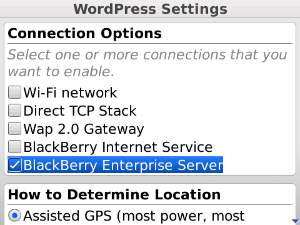
In the setup screen disable all other Connection Options and enable only “BlackBerry Enterprise Server” (this appears to be off by default):

Now Apache will allow only your BlackBerry (well, and any other BlackBerry in the same organization) to connect to your blog.
Just received my first donation. Thanks!
The newest version (0.5) of my WordPress Plugin “Block Top Spammers” now updates the .htaccess file automatically (if it is writable). The other major change is improved support for IPv6.
The newest version (0.3) of my Comment E-Mail Verification plugin now supports SMTP as an alternative method to send mail.
Download it directly from the wordpress.org plugin directory
Thanks to Mark for testing and feedback
It is also the first version to come with a German translation.
If you would like to help by translating this plugin to another language please download the plugin, grab the .pot file, create .po and .mo files and e-mail them to me. (You will be credited.) If this was all gibberish to you you can still help: please start by reading Translating WordPress Plugins & Themes – Of course you may contact me at anytime to find out whether anyone else has announced or sent to me a translation to that language already. This will avoid any unnecessary efforts on your side.
There was a very unfortunate bug in all previous versions of the Comment E-Mail Verification Plugin. The verification message was sent to all comment authors, i.e. including those whose comments were caught by Akismet (or any other anti-spam plugin).
I strongly recommend you update to the new version 0.1.2.1
Spammers often use fake mail addresses. If an address doesn’t exist, your only problem is some additional server load trying to deliver that message, plus, possibly, bounces in your inbox.
However if, as in most cases, those addresses actually belong to someone who didn’t write that comment in the first place, those people will be bothered. Plus, since the comment itself may appear in the verification message (the default setting), you will be considered a spammer. Even worse, this might get your server blacklisted!
So if you’ve been using the plugin, please download the new version 0.1.2.1
Due to excessive work-load this post was written two days after the release of the bugfix which was available through your WordPress admin area immediately. I have set the date of this post back to approximately the time of the bugfix release.

Mark Jaquith has a wonderful plugin for plugin developers: I Make Plugins. While working on the redesign of this site I ran across a bug in that plugin which caused the entire readme to be downloaded and stored to the postmeta table every time a plugin page was loaded. Here’s a patch (diff) for version 1.1 of the plugin.
My Comment E-Mail Verification Plugin for WordPress has received some tender loving care: blog admins can now customize the messages sent to comment authors. Download from wordpress.org
Nils asked me whether I knew about a WordPress plugin that would verify a comment author’s e-mail address. I didn’t, so I wrote one myself.
The plugin is in its early stages, the current version number is 0.1 – you are welcome to test-drive it and watch it grow, or watch me procrastinate and forget about it over my day-job :/ if I do, go ahead and nag!
Download the latest version (ZIP).
If you have a question about the plugin please go to the plugin’s homepage.
This release has been internationalized. I have created a German language file myself. If you would like to create a language file in your language you are more than welcome to do so (POT file is included with the plugin). Please contact me by posting a comment on this post (and be sure to provide the correct e-mail address so I can write back) to have it included in the next release.

Recent Comments